Wednesday, July 29, 2009

Nice mac-style menu (PyrusMalus )

I ran across this website while looking for some icons. Really cool mac-style javascript menu. Nifty!!!!

PyrusMalus
http://www.pyrusmalus.com


Tuesday, July 28, 2009

Why I am excited about the Azure Platform's .Net Service Bus

Basically, the following statement:

"...Full-duplex, connection-oriented peer-to-peer sessions with network-boundary traversal create direct end-to-end connectivity through NAT"

That's awesome... because any developer that has ever tried to create a real-time, Peer-to-Peer application, he/she knows what hell it is to penetrate firewalls specially Symmetric NATs. Click here to learn about NATs

The Service Bus enables secure, loosely-coupled connectivity between services and applications to navigate firewalls or network boundaries, using a variety of communication patterns. The Access Control service provides an enterprise-class mechanism for federated authorization across organizations and protocols.

In the same way that Microsoft® .NET Framework provides higher-level libraries to make developers more productive, .NET Services help developers focus on their application logic rather than deploying and managing their own cloud-based infrastructure."

Azure's .Net Service Bus enables developers to build applications for the cloud and offers a scalable hosted infrastructure for deploying and managing these applications and their data stores combined with a workflow engine and a security infrastructure. The Azure Service platform is the new OS for internet scaled applications.

Lower Barriers to Building Composite Applications

Using the Service Bus, an application or service can expose and access endpoints that would otherwise be hard or impossible to reach. For example, the endpoints may be located behind network address translation (NAT) boundaries or bound to frequently changing, dynamically assigned IP addresses.
  • Exposes Service Endpoints Easily

    >> Users can access a global hierarchical namespace that is DNS- and transport- independent

    >> Services can be located through a stable, Internet-accessible URL, irrespective of location.

  • Offers Multiple Connection Options

    >> One-way messaging between sender and listener supports unicast and multicast datagram distribution

    >> Full-duplex connection-oriented sessions between sender and listener support bi-directional communication

    >> Full-duplex, connection-oriented peer-to-peer sessions with network-boundary traversal create direct end-to-end connectivity through NAT

  • Supports Publish and Subscribe for Multicasting

    The simple publish/subscribe model lets multiple publishers and multiple subscribers simultaneously use the service’s topic management and event distribution system


More on Azure .Net Service Bus

According to recent traffic studies, the BitTorrent protocol is now responsible for roughly half of all Internet traffic. That's a lot of sharing of personal photos, self-sung songs, and home videos. Half! Next to text messaging, Instant Messaging applications are the social lifeline for our teenagers these days – so much that the text messaging and IM lingo is starting to become a natural part of the colloquial vocabulary everywhere. Apple's TV, Microsoft's Xbox 360, and Netflix are shaking up the video rental market by delivering streamed or downloadable high-quality video and streams on YouTube have become the new window on the world. Gamers from around the world are meeting in photorealistic virtual online worlds to compete in races, rake in all the gold, or blast their respective Avatars into tiny little pieces.

What does all of that have to do with Web 2.0? Very little. While it's indisputable that the Web provides the glue between many of those experiences, the majority of all Internet traffic and very many of the most interesting Internet applications depend on bi-directional, peer-to-peer connectivity.

These familiar consumer examples have even more interesting counterparts in the business and industrial space. Industrial machinery has ever increasing remote management capabilities that allow complete remote automation, reprogramming, and reconfiguration. Security and environment surveillance systems depend on thousands of widely distributed, remotely controlled cameras and other sensors that sit on street poles, high up on building walls, or somewhere in the middle of a forest. Terrestrial and satellite-based mobile wireless technologies make it possible to provide some form of digital connectivity to almost any place on Earth, but making an array of devices addressable and reachable so that they can be integrated into and controlled by a federated, distributed business solution that can leverage Internet scale and reach remains incredibly difficult.

The primary obstacle to creating pervasive connectivity is that we have run out of IPv4 addresses. There is no mere threat of running out, we're already done. The IPv4 space is practically saturated and it's really only network address translation (NAT) that permits the Internet to grow any further. The shortage is already causing numerous ISPs to move customers behind NATs and not to provide them with public IP address leases any longer. Getting a static public IP address (let alone a range) is getting really difficult. IPv6 holds the promise of making each device (or even every general-purpose computer) uniquely addressable again, but pervasive IPv6 adoption that doesn't require the use of transitional (and constraining) tunneling protocols will still take many years.

The second major obstacle is security. Since the open network is a fairly dangerous place these days and corporate network environments are often und unfortunately not much better, the use of Firewalls has become ubiquitous and almost all incoming traffic is blocked by default on the majority of computers these days. That's great for keeping the bad guys out, but not so great for everything else – especially not for applications requiring bi-directional connectivity between peers.

Since these constraints are obviously well-known and understood there is a range of workarounds. In home networking environments the firewall and NAT issues are often dealt with by selectively allowing applications to open inbound ports on the local and network router firewalls using technologies like UPnP or by opening and forwarding port by ways of manual configuration. Dynamic DNS services help with making particular machines discoverable even if the assigned IP address keeps changing. The problem with those workarounds is that they realistically only ever work for the simplest home networking scenarios and, if they do work, the resulting security threat situation is quite scary. The reality is that the broadly deployed Internet infrastructure is optimized for the Web: clients make outbound requests, publicly discoverable and reachable servers respond.

If your application requires bi-directional connectivity you effectively have two choices: Either you bet on the available workarounds and live with the consequences (as BitTorrent does) or you build and operate some form of Relay service for your application. A Relay service accepts and maintains connections from firewalled and/or NAT-ed clients and routes messages between them. Practically all chat, instant messaging, video conferencing, VoIP, and multiplayer gaming applications and many other popular Internet applications depend on some form of Relay service.

The challenge with Relay services is that they are incredibly hard to build in a fashion that they can provide Internet scale where they need to route between thousands or even millions of connections as the large Instant Messaging networks do. And once you have a Relay that can support such scale it is incredibly expensive to operate. So expensive in fact that the required investments and the resulting operational costs are entirely out of reach for the vast majority of software companies. The connectivity challenge is a real innovation blocker and represents a significant entry barrier.

The good news is that Microsoft .NET Service Bus provides a range of bidirectional, peer-to-peer connectivity options including relayed communication. You don't have to build your own or run your own; you can use this Building Block instead. The .NET Service Bus covers four logical feature areas: Naming, Registry, Connectivity, and Eventing.

Naming

The Internet's Domain Name System (DNS) is a naming system primarily optimized for assigning names and roles to hosts. The registration records either provide a simple association of names and IP addresses or a more granular association of particular protocol roles (such as identifying domain's mail server) with an IP address. In either case, the resolution of the DNS model occurs at the IP address level and that is very coarse grained. Since it is IP address centric, a DNS registration requires a public IP address. Systems behind NAT can't play. Even though Dynamic DNS services can provide names to systems that do have a public IP address, relying on DNS means for most ISP customers that the entire business site or home is identified by a single DNS host entry with dozens or hundreds of hosts sitting behind the NAT device.

If you want to uniquely name individual hosts behind NATs, differentiate between individual services on hosts, or want to name services based on host-independent criteria such as the name of a user or tenant, the DNS system isn't an ideal fit.

The .NET Service Bus Naming system is a forest of (theoretically) infinite-depth, federated naming trees. The Naming system maintains an independent naming tree for each tenant's solution scope and it's up to the application how it wants to shape its tree. 'Solution' is a broad term in this context meant to describe a .NET Service Bus tenant – on the customer side, a Service Bus application scope may map to dozens of different on-site applications and hundreds of application instances.

Any path through the naming tree has a projection that directly maps to a URI.

Let's construct an example to illustrate this: You design a logistics system for a trucking company where you need to route information to service instances at particular sites. The application scope is owned by your client, 'ContosoTrucks' which has a number of logistics centers where they want to deploy the application. Your application is called 'Shipping' and the endpoints through which the shipping orders are received at the individual sites are named 'OrderManagement'. The canonical URI projection of the mapping of New York's order management application endpoint instance into the ServiceBus Naming system is
http://servicebus.windows.net/services/contoso/NewYork/Shipping/OrderManagement/

The significant difference from DNS naming is that the identification of services and endpoints moves from the host portion of the URI to the path portion and becomes entirely host-agnostic. The DNS name identifies the scope and the entry point for accessing the naming tree. That also means that the path portion of the URI represent a potentially broadly distributed federation of services in the Naming service, while the path portion of a 'normal' URI typically designates a collocated set of resources.

There is no immediate access API for the Naming system itself. Instead, access to the Naming system is provided through the overlaid Service Registry.

Service Registry

The Service Registry allows publishing service endpoint references (URIs or WS-Addressing EPRs) into the Naming system and to discover services that have been registered.

The primary access mechanism for the Service Registry is based on the Atom Publishing Protocol (APP) allowing clients to publish URIs or EPRs by sending a simple HTTP PUT request with an Atom 1.0 'item' to any name in the naming tree. It's removed by sending an HTTP DELETE request to the same name. There is no need to explicitly manage names – names are automatically created and deleted as you create or delete service registry entries.

Service discovery is done by navigating the naming hierarchy, which is accessible through a nested tree of Atom 1.0 feeds whose master-feed is located at http://servicebus.windows.net/services/[solution]/. Any publicly registered service is accessible through the feed at the respective location.

In addition to the Atom Publishing Protocol, the Service Registry also supports publishing, accessing, and removing endpoint references using WS-Transfer and the Relay service will automatically manage its endpoints in the Service Registry without requiring any additional steps.

The Service Registry is an area that will see quite significant further additions over the next few milestones including support for service categorization, search across the hierarchy, and support for additional high-fidelity discovery protocols.

Connectivity

The core of the connectivity feature area of the .NET Service Bus is a scalable, general-purpose Relay service. The Relay's communication fabric supports unicast and multicast datagram distribution, connection-oriented bi-directional socket communication and request-response messaging.

Towards listening services the Relay takes on the same role as operating-system provided listeners such as Windows' HTTP.SYS. Instead of listening for HTTP requests locally, a relayed HTTP service establishes an HTTP listener endpoint inside the cloud-based Relay and clients send requests to that cloud-based listener from where they are forwarded to the listening service.

The connection between the listener and the Relay is always initiated from the listener side. In most connection modes (there are some exceptions that we'll get to) the listener initiates a secured outbound TCP socket connection into the Relay, authenticates, and then tells the Relay at which place in the naming tree it wants to start listening and what type of listener should be established.

Since a number of tightly managed networking environments block outbound socket connections and only permit outbound HTTP traffic, the socket based listeners are complemented by an HTTP-based multiplexing polling mechanism that builds on a cloud-based message buffer. In the PDC release the HTTP-based listeners only support the unicast and multicast datagram communication, but bidirectional connectivity is quite easily achievable by pairing two unicast connections with mutually reversed client and listener roles.

A special variation of the bi-directional socket communication mode is 'Direct Connect'. The 'Direct Connect' NAT traversal technology is capable of negotiating direct end-to-end socket connections between arbitrary endpoints even if both endpoints are located behind NAT devices and Firewalls. Using Direct Connect you can start connections through the Relay and 'Direct Connect' will negotiate the most direct possible connectivity route between the two parties and once the route is established the connection will be upgraded to the direct connection – without information loss.

With these connectivity options, the Relay can provide public, bi-directional connectivity to mostly any service irrespective of whether the hosting machine is located behind a NAT or whether the Firewalls layered up towards the public network don't allow inbound traffic. The automatic mapping into the Naming system means that the service also gains a public address and the service can, on demand, be automatically published into the Service Registry to make the service discoverable.

In addition to providing NAT and Firewall traversal and discoverability the delegation of the public network endpoint into the Relay provides a service with a number of additional key advantages that are beneficial even if NAT traversal or discoverability are not a problem you need to solve:
  • The Relay functions as a "demilitarized zone" that is isolated from the service's environment and takes on all external network traffic, filtering out unwanted traffic.

  • The Relay anonymizes the listener and therefore effectively hides all details about the network location of the listener thus reducing the potential attack surface of the listening service to a minimum.

  • The Relay is integrated with the Access Control Service and can require clients to authenticate and be authorized at the Relay before they can connect through to the listening service. This authorization gate is enabled by default for all connections and can be selectively turned off if the application wants to perform its own authentication and authorization.

These points are important to consider in case you are worried about the fact that the Relay service provides Firewall traversal. Firewalls are a means to prevent undesired foreign access to networked resources – the Relay provides a very similar function but does so on an endpoint-by-endpoint basis and provides an authentication and authorization mechanism on the network path as well.

If your applications are already built on the .NET Framework and your services are built using the Windows Communication Foundation (WCF) it's often just a matter of changing your application's configuration settings to have your services listen on the Relay instead on the local machine.

The Microsoft.ServiceBus client framework provides a set of WCF bindings that are very closely aligned with the WCF bindings available in the .NET Framework 3.5. If you are using the NetTcpBinding in your application you switch to the NetTcpRelayBinding, the BasicHttpBinding maps to the BasicHttpRelayBinding, and the WebHttpBinding has its equivalent in the WebHttpRelayBinding. The key difference between the standards WCF bindings and their Relay counterparts is that they establish a listener in the cloud instead of listening locally.

All WS-Security and WS-ReliableMessaging scenarios that are supported by the standard bindings are fully supported through the Relay. Transport-level message protection using HTTPS or SSL-protected TCP connections is supported as well.

If the listener chooses to rely on WS-Security to perform its own authentication and authorization instead of using the security gate built into the Relay, the HTTP-based Relay bindings' policy projection is indeed identical to their respective standard binding counterparts which means that client components can readily use the standard .NET Framework 3.5 bindings (and other WS-* stacks such as Sun Microsystems' Metro Extensions for the Java JAX-WS framework).

If you prefer RESTful services over SOAP services, you can build them on the WebHttpRelayBinding using the WCF Web programming model introduced in the .NET Framework 3.5. The Relay knows how to route SOAP 1.1, SOAP 1.2 messages and arbitrary HTTP requests transparently.

The NetEventRelayBinding doesn't have an exact counterpart in the standard bindings. This binding provides access to the multicast publish/subscribe capability in the Relay. Using this binding, clients act as event publishers and listeners act as subscribers. An event-topic is represented by an agreed-upon name in the naming system. There can be any number of publishers and any number of subscribers that use the respective named rendezvous point in the Relay. Listeners can subscribe independent of whether a publisher currently maintains an open connection and publishers can publish messages irrespective of how many listeners are currently active – including zero. The result is a very easy to use lightweight one-way publish/subscribe event distribution mechanism that doesn't require any particular setup or management.

The discussion of the close alignment between the Relay's .NET programming experience and the standard .NET Framework shouldn't imply that the Relay requires the use of the .NET Framework. Microsoft is working with community partners to provide immediate and native Relay support for the Java and Ruby platforms of which initial releases will be available at or shortly after PDC with more language and platform support lined up in the pipeline.

The Relay provides connectivity options that allow you build bidirectional communication links for peer-to-peer communication, allows making select endpoints securely and publicly reachable without having to open up the Firewall floodgates, and provides a cloud-based pub/sub event bus that permits your application to distribute events at Internet scale. I could start enumerating scenarios at this point, but it seems like a safe bet that you can already think of some.

Find out more here:
http://www.microsoft.com/azure/default.mspx
http://www.microsoft.com/azure/servicebus.mspx

Monday, July 27, 2009

Book: Weird Ideas That Work: 11 1/2 Practices for Promoting, Managing, and Sustaining Innovation

I came across this interesting book by Robert I. Sutton, consultant and professor at the Stanford Engineering School.

Weird Ideas That Work: 11 1/2 Practices for Promoting, Managing, and Sustaining Innovation

In this book, Sutton, consultant and professor at the Stanford Engineering School, advocates taking a nontraditional approach to innovation and management in this quirky business manual.


He advises taking unorthodox actions, suggesting managers should forget the past, especially successes; hire people who make them uncomfortable and hire slow learners. According to Sutton, these unconventional steps are particularly important when companies are dealing with unusual problems or stuck in a rut. Standard management policy may work for routine work matters, but weird ideas are far more effective when employees are trying to use innovative techniques.

Sutton uses many real-life examples, like Tetley's pioneering round teabags, to show readers how his suggestions can work. But he observes that even companies such as IBM, Lucent and GE, which have been praised for their innovation, devote only a small percentage of their annual budgets to testing new products and services. Sutton's writing is clear and persuasive, and his book takes an insightful look at innovation.

Awesome read!!!!

Saturday, July 25, 2009

Open Source VoIP

I have been looking for a decent open source VoIP project. Here are some good ones I have found so far:


  1. wxCommunicator

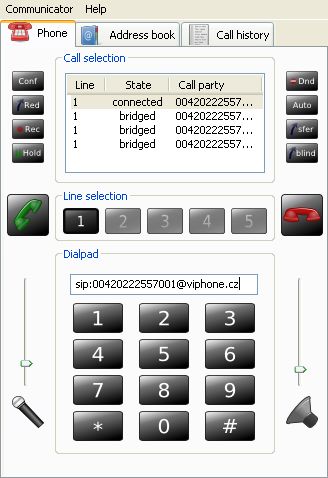
    wxCommunicator is a cross platform open source SIP softphone enabling users to make multiple calls, use several accounts, chat and create conferences. It is very configurable and should work with any VoIP provider. It is based on customized sipXtapi client library and wxWidgets 2.8.x GUI library and distributed under GNU GPL version 2 licence.

    More Info

  2. VMukti

    VMukti is leading Asterisk/ Yate enabled p2p Video IP Communications Suite for Web / PSTN. These serverless broadband ready platform enable OS community to save 90% on capital & operating costs over proprietary software for conferencing & Call Center.

    More Info

  3. GibPhone

    GibPhone is a highly extensible VoIP/IM client for the .NET framework that uses a powerful plugin engine to allow for UI extensions and any call control stack / media payload / transport protocol combination.

    More Info

  4. Ekiga

    Ekiga (formely known as GnomeMeeting) is an open source VoIP and video conferencing application for GNOME. Ekiga uses both the H.323 and SIP protocols. It supports many audio and video codecs, and is interoperable with other SIP compliant software and also with Microsoft NetMeeting.

    More Info

  5. TStone

    TStone is a p2p voip system.It can run on windows or linux. It supports h.323 and sip signaling.It is writed by c/c++ code

    More Info

  6. Landell Voip Application

    A Voip GUI write in C#, based in Tapioca-Voip framework, 100% compatible with Gtalk.

    More Info

  7. Peer to Peer Chat in C#

    Using Microsoft's Peer-to-Peer technology and Adrian Moore's encapsulation, to create an easy to use library for chatting.

    More Info

  8. SIP Stack with SIP Proxy

    C# implementation of SIP

    More Info

  9. Sipek SDK

    SipekSDK is a small VoIP Software Development Kit written in C#. The goal of SipekSDK is to offer simple and easy to use API for VoIP developers.

    More Info

  10. My SIP Switch

    A SIP signalling consolidation tool that allows multi-user management of diverse SIP providers and allows central management of any SIP based VoIP service. Included in this project are a SIP Stack, SIP Registrar, SIP Registration UAC, SIP Stateful Proxy, STUN Server and more. The components are all written in C#.

    More Info

Thursday, July 23, 2009

WCF Hosting

Windows Communication Foundation (WCF) Services can be hosted with Internet Information Services (IIS); with the new Windows Activation Service (WAS) installed with IIS 7.0; or with any managed application process including console, Windows Forms, Windows Presentation Foundation (WPF), or managed Windows service applications.

Selecting the right hosting environment for your services is a choice driven largely by deployment requirements related to transport protocol and operating platform.

A summary of hosting options and supported features:

FeatureSelf-HostingIIS HostingWAS Hosting
Executable Process/ App DomainYesYesYes
ConfigurationApp.configWeb.configWeb.config
ActivationManual at startupMessage-basedMessage-based
Idle-Time ManagementNoYesYes
Health MonitoringNoYesYes
Process RecyclingNoYesYes
Management ToolsNoYesYes


A summary of hosting options based on operating platform and communication protocol:

Operating PlatformProtocolHosting Options
Windows XP/SP2HTTPIIS 5.1 or self-host
Named Pipes, TCP, MSMQSelf-host
Windows VistaHTTP, Named Pipes, TCP, MSMQWAS or self-host
Windows Server 2003HTTPIIS 6.0
Named Pipes, TCP, MSMQSelf-host
Windows Longhorn ServerHTTP, Named Pipes, TCP, MSMQIIS 7.0/WAS or self-host


What is Google Latitude?


Google Latitude is Google’s free software program, a new service that helps you to locate your family member or friends through a mobile phone or the Internet. It was released by Google, on Wednesday, Feb 04, 2009.

Google Latitude uses Global Positioning System, WiFi, and cell tower location data to find/ track/ locate people. The extension of Google Maps, the service also uses Google's mapping software for mobile phones.

Google Latitude lets users to manually turn on and off the tracking software; thus it gives users choice when they should be or should not be seen. It also lets users to choose the people who should be able to locate them. For using Google Latitude, the users are required to sign up for the service,

In its blog, Google said, "Fun aside, we recognize the sensitivity of location data, so we've built fine-grained privacy controls right into the application. You not only control exactly who gets to see your location, but you also decide the location that they see."

Steve Lee, product manager for Google Latitude, reported that Google Latitude is currently available to the users in 27 countries. Initially, it will work on most color-screen BlackBerry phones, most phones with Windows Mobile 5.0 or later, most Symbian-based devices such as Nokia smartphones, and G1 phones with updated Android operating system. Eventually, the service will run on Apple's iPhone and iTouch and many Sony Ericsson devices.

Sign up for Google Latitude Service


MSMQ, WCF and IIS: Getting them to play nice

I was doing some research on Hosting my WCF Service in IIS 6. My service supports both synchronous and asynchronous behavior (using msmq).

Below is a summary of hosting options based on operating system platform and communucation protocol:

Operating Platform Protocol Hosting OptionsWindows XP/SP2 HTTP IIS 5.1 or self-host Named Pipes, TCP, MSMQ Self-hostWindows Vista HTTP, Named Pipes, TCP, MSMQ WAS or self-hostWindows Server 2003 HTTP IIS 6.0 Named Pipes, TCP, MSMQ Self-hostWindows “Longhorn” Server HTTP, Named Pipes, TCP, MSMQ IIS 7.0/WAS or self-host


MSMQ, WCF and IIS 7
I found this article that contains very good information on getting MSMQ, WCF and IIS 7 (WAS) to play nice.


Also Read: