Showing posts with label BizTalk. Show all posts

Friday, August 5, 2011

BizTalk 2010 Recipes : Importing Schemas

To import an existing XML schema into another schema...

You can use the XSD Import method within the BizTalk Editor to reuse an existing common XML object structure within another, as opposed to manually creating an entire schema. As an example, assume you have two simple XML structures, Customer and Address:

<Customer>
  <FirstName> </FirstName>
  <LastName> </LastName>
  <MiddleInit> </MiddleInit>
  <Age></Age>
</Customer>

<Address>
  <AddrLine1> </AddrLine1>
  <AddrLine2> </AddrLine2>
  <AddrLine3> </AddrLine3>
  <Zip> </Zip>
  <State> </State>
  <Country> </Country>
</Address>

To use the XSD Import method to allow this scenario within BizTalk, follow these steps:
  1. Open the project that contains the existing schema (in this case, the Customer schema).
  2. Double-click the Customer schema to open it.
  3. Right-click the root node of the Customer schema, and select Properties.
  4. In the Properties window, click the ellipsis next to Imports to open the Imports dialog box, which is shown in Figure 1
  5. Select XSD Import as the import type, and click the Add button.
  6. In the BizTalk Type Picker dialog box, select the Schemas tree node, and select the Address schema.

Figure 1. Imports dialog box


NOTE


In this example, the Address schema is within the current BizTalk project. If the schema existed outside the BizTalk project, the schema could be imported by selecting the Reference tree node.

The preceding procedure imports the Address schema into the Customer schema. To use the Address schema, follow these steps:
  1. Click the Customer node in the Customer schema.
  2. Right-click and select Insert Child Record.
  3. Click the newly created child record.
  4. In the Properties window, click the Data Structure Type drop-down list, and select the Address reference.
The Customer schema is now referencing and using the Address schema via the Imports schema method within the BizTalk tool set.

3. How It Works

Within the BizTalk tool set, there are a variety of ways in which you can construct XML schemas. The choices revolve around common architecture principles such as reuse, development best practices for schema organization, and fundamental development preferences.

This example illustrated using the Imports method for referencing schema. The Imports dialog box offers three choices for achieving the schema reference activity (step 5 of the recipe):
Include: This method physically includes a schema definition within another. The common usage would be to create a static reference of a schema during the schema build process. This choice could be used to leverage previously defined XSD schema (for example, publicly available schema). The include schema must be the same target namespace of the schema you are including. Alternatively, the target namespace of the include schema can be blank.


Import: The most commonly used import method within BizTalk, the Import option includes XSD Imports statements within the source schema definition. By using this option, namespaces and XSD object structures within the target schema are available for use within the source schema in read-only fashion. The practical application for this choice revolves around common reuse, such as reuse of an existing schema artifact or use of a publicly available XML schema.


Redefine: The least-common import method within BizTalk, the Redefine option, like the Import option, allows namespaces and XSD object references to be used within the source definition. However, the Redefine option allows objects and data structures to be overridden within the source definition. Common uses could be to create an inheritance model or to reuse and customize an existing XSD structure.

This example demonstrated referencing other schemas within the BizTalk tool set. However, while BizTalk provides and implements standard XSD instructions to achieve this functionality, common architecture usage and choices should not be ignored to ensure the correct schema reference method is selected.

Friday, June 3, 2011

Video - BizTalk Server, SOA and the Shift to the Cloud


In the session Richard Seroter discusses the continued relevance of SOA and how to apply SOA principles when designing and exposing services from BizTalk Server. (View session 2)

Richard Seroter is a solutions architect for an industry-leading biotechnology company, a Microsoft MVP for BizTalk Server, and a Microsoft Connected Technology Advisor. He has spent the majority of his career consulting with customers as they planned and implemented their enterprise software solutions. Richard worked first for two global IT consulting firms, which gave him exposure to a diverse range of industries, technologies, and business challenges. Richard then joined Microsoft as a SOA/BPM technology specialist where his sole objective was to educate and collaborate with customers as they considered, designed, and architected BizTalk solutions. One of those customers liked him enough to bring him onboard full time as an architect after they committed to using BizTalk Server as their enterprise service bus. Once the BizTalk environment was successfully established, Richard transitioned into a solutions architect role where he now helps identify enterprise best practices and applies good architectural principles to a wide set of IT initiatives. Richard maintains a semi-popular blog of his exploits, pitfalls, and musings with BizTalk Server, SOA and enterprise architecture at http://seroter.wordpress.com/.

Presented by Richard Seroter.

Length: 52 minutes 01 seconds

Videos: WMV (Zip) | WMV | iPod | MP4 | 3GP | Zune | PSP

Audio: AAC | WMA | MP2 | MP3 | MP4


Exposing BizTalk Applications on the Cloud using AppFabric Connect for Services

With the advent of the cloud and enterprises building cloud-based applications, enterprises will still want to use their existing on-premise applications. Thus, one of the key requirements in building hybrid cloud-based applications across on-premise and on-cloud environments is the ability to use pre-existing on-premise applications. The BizTalk Server 2010 AppFabric Connect for Services feature now allows BizTalk users to expose their on-premise BizTalk Applications as WCF Services on the cloud, by adding Windows Azure AppFabric Service Bus endpoints. These Service Bus endpoints can subsequently be consumed by clients residing outside the enterprise’s organizational firewall.

Before we go deeper into details of exposing BizTalk Applications to the cloud, let us clarify how cloud related technologies have impacted application and service deployment. We can divide the application and service deployment scenarios into two broad categories:

  • On-premises deployment: An application or service that runs within an organization’s firewall and is typically accessed by clients that are within the firewall.
  • On-cloud deployment: An application or service that runs within an organizational firewall and can be accessed by clients inside or outside the firewall through a Service Bus endpoint exposed in the cloud. The services still run locally in IIS. Only the endpoints are exposed in the cloud.

Windows Azure AppFabric Service Bus provides the capability to take on-premise web services and extend their reach to external clients. Windows Azure AppFabric Service Bus supports this on-cloud scenario with a relay service that can listen to external clients on behalf of the on-premise web service at a given public address and relay messages between both parties.

Windows Azure AppFabric Service Bus provides the platform where developers expose the Service Bus endpoints for their on-premises services. AppFabric Connect for Services enhances the capabilities of theBizTalk WCF Service Publishing Wizard to enable developers to expose on-premise BizTalk application operations to external clients as WCF services via the Windows Azure AppFabric Service Bus relay service.

What does the BizTalk WCF Service Publishing Wizard do?

The BizTalk WCF Service Publishing Wizard essentially exposes the operations in BizTalk Applications as WCF services. AppFabric Connect for Services enhances the wizard to support the relay service provided by Azure AppFabric Service Bus. The wizard enables you to select the operations that you want to expose as services and then creates the following:

  • A local endpoint for the WCF service.
  • A Service Bus endpoint for the WCF service.
  • A Service Bus endpoint for metadata exchange with the WCF service (if configured).
  • Receive ports in the BizTalk Application, which are used to bind to the desired operations.

Security Considerations when Exposing Services on Cloud

Security becomes a paramount concern when organizations expose mission critical data and operations to services outside an organization’s protected environment. To address these concerns, organizations can follow certain security best-practices to ensure that only authenticated clients get access to the service.

  • Client authentication by the Service Bus Relay Service. All the Service Bus relay bindings expose a binding property, ‘RelayClientAuthenticationType’, that controls whether the client consuming the service is required to present an authentication token to the relay service. This property can be set to either ‘None’ or ‘RelayAccessToken’. If the property is set to ‘RelayAccessToken’, the client must provide an authentication token to the Service Bus. The authentication token must be communicated separately to the client, for example, as an e-mail message by the organization hosting the service. In addition to implementing security, setting ‘RelayClientAuthenticationType’ is also a cost-effective solution for the organization hosting the service. If there is no authentication from the Service Bus, any client would be able to hit the service endpoint even if it is eventually denied by the service. As a result, the organization would incur a chargeback even though there was no business operation that resulted.
  • Message-level and transport-level security. WCF inherently provides message-level and transport-level security for services. For more information on message- and transport-level security, seehttp://msdn.microsoft.com/en-us/library/ms733137.aspx.

Tip: It’s not essentially a security setting, but organizations can also secure the services which are exposed on the cloud by not making the endpoints publicly discoverable. Service Bus provides an ATOM feed which lists all the publicly discoverable endpoints under a given Service Namespace. Making the endpoints discoverable is controlled through the “DiscoveryMode” attribute of an endpoint's behavior in the "ServiceRegistrySetting". This can be set using the BizTalk WCF Adapter Publishing wizard. The disadvantage of not making the endpoints publicly discoverable is that if you have a large number of clients that would be using the service you hosted, you will have to communicate the endpoint URL to each of those clients.

Who Should Read This Whitepaper?

This whitepaper assumes some familiarity with Microsoft BizTalk Server, Windows Azure AppFabric Service Bus, Windows Azure AppFabric Access Control Service (ACS), and Windows Communication Foundation (WCF). This whitepaper is intended for the following users:

  • Organizations that want to extend the reach of their on-premises BizTalk applications to the cloud by exposing them as WCF Services with endpoints in Windows Azure AppFabric Service Bus.
  • Users that want to consume the web service that is extended to the cloud, to perform operations implemented in BizTalk Application that are deployed inside an organization’s firewall.

Read the rest of the post @ technet.microsoft.com...


Tuesday, March 22, 2011

Orchestration VS Schemas as a Web Service (BizTalk Web Services Publishing Model)

BizTalk Web Services publishing wizard offers two options: Publish orchestrations and Publish schemas as a web services. What is the difference and when should we prefer one to another? Below are some practical considerations that may help one to decide.

Publishing Orchestrations

Pros:

  • Short development cycle, well suited for agile iterative development
  • Easy to use and understand by developers
  • No special XML Schema, WSDL skills needed

Cons:

  • Limited control over the message schema, no flexibility to optimize it
  • Poor collaboration model - can't share service contract among parties until it's stable
  • Weak interoperability control
  • Encourages bottom-up design approach, as the result is a high chance of tight coupling services and overall poor solution design that doesn’t scale and is not truly “service oriented”

Publishing Schemas

Pros:

  • Encourages top-down contract-first approach that enables designing true service oriented solutions
  • Emphasis on message helps designing better messages aligned with business processes
  • Gives control over the message schema
  • Opens opportunity to share service contract among participants in collaborative development
  • Potential to create more interoperable services
  • Possibility of optimizing service performance
  • Isolated services development and easy iteration over stabilized schema

Cons:

  • Requires skilled developers who know XML Schema, understand WSDLs and appropriate tools
  • Longer initial design phase, difficult to conduct iterations before schema is stabilized because of manual work involved
  • Poor implementation of WSDL generation, manual tweaking of service description required
  • Limited toolset to support development process


Summary:

Publishing schemas as web services is the choice to consider when:

  • Designing top-down contract-first global scoped services (for example, consumed from outside of the enterprise boundaries, i.e. B2B)
  • When designed service should follow existing or given service contract, for instance some standard industry schema
  • No or little control over service consumers, change management is difficult or impossible
  • Large complex solutions with high number of dependencies
  • Collaborative development involves multiple parties sharing the same service contract
  • Interoperability is a major concern
  • Project timeline allows time for thorough messaging schema design
  • Developers available with XML Schema and WSDL skills

Publishing orchestrations is a way to go when:

  • Implementing simple solutions with small number of dependencies when we have control over both consumer and service endpoints
  • Rapid prototyping, proof-of-concepts, service stubs
  • Developing local scoped services, when collaboration is not an issue
  • Don’t care much about interoperability
  • No skilled XML Schema, WSDL developers available


Thursday, March 10, 2011

BizTalk: Changing the Outbound Namespace

I run into an interesting requirement to make sure my outbound xml file uses a specific namespace prefix. Since the BizTalk mapper always generates xml documents with the “ns0″ prefix I wasn’t quite sure how to accomplish this and posted my question to the microsoft.public.biztalk.general newsgroup. It turns out to be very straight-forward to accomplish.


Monday, October 4, 2010

BizTalk Step-By-Step


BizTalk Step-By-Step

An easy way to learn BizTalk development & deployment

Blog to keep in mind if you are a BizTalk developer.


Tuesday, April 13, 2010

ESB Guidance: Creating and Publishing Fault Messages

To help you understand how you can use the features of the Exception Management Framework to manage exceptions, this section walks through a common scenario based on the submission of a message to an ESB application.

The scenario consists of a user submitting an invoice to the system. During the course of processing the invoice in an orchestration, the BizTalk Business Rule Engine throws an application exception because some part of the data is incorrect. The business process should catch the exception, send the offending message to another person or system that can correct the message, and resubmit the message for processing.

When using the ESB Failed Orchestration Exception Routing feature, the process steps are the following:

  1. Code in the exception handler that detects the error creates a fault message by calling the CreateFaultMessage method, as shown in the following code example.

    // Create fault exception message faultMsg = Microsoft.Practices.ESB.ExceptionHandling.ExceptionMgmt.CreateFaultMessage();
  2. The ESB Exception mechanism automatically inserts the error description into the fault message context (for example, “The Business Rule Engine threw a divide by zero error processing the LoanProcessing policy”).

  3. The ESB Exception mechanism automatically promotes failure-specific and application-specific properties into the fault message context, setting the values from the current environment. These properties are the following:

    Application
    (auto-populated)
    DateTime (auto-populated as a UTC value)
    Description (auto-populated—the exception message)
    ErrorType (auto-populated—the exception type)
    MachineName (auto-populated—the current server name)
    Scope (auto-populated—the Scope shape containing the current exception handler)
    ServiceName (auto-populated—the orchestration name)
    ServiceInstanceID (auto-populated—the orchestration instance ID as a GUID)

  4. Code in the exception handler sets other properties of the fault message as required, as shown in the following code example.
    // Set fault message properties faultMsg.Body.FailureCategory = "MessageBuild"; faultMsg.Body.FaultCode = 1000; faultMsg.Body.FaultDescription = "Some error occurred"; faultMsg.Body.FaultSeverity =    Microsoft.Practices.ESB.ExceptionHandling.FaultSeverity.Severe;

  5. The ESB Exception mechanism automatically serializes the current Exception object into the fault message.

  6. Code in the exception handler can optionally add current orchestration messages to the ESB fault message using the AddMessage(faultMsg, messageToAdd) method. This serializes and persists the message, including all the context properties, as shown in the following code example.

    // Add other current orchestration messages to the fault message Microsoft.Practices.ESB.ExceptionHandling.ExceptionMgmt.AddMessage(                             faultMsg, approvedRequestMsg); Microsoft.Practices.ESB.ExceptionHandling.ExceptionMgmt.AddMessage(                             faultMsg, DeniedRequestMsg, @"c:\temp");  
  7. Code in the exception handler publishes the ESB fault message through a direct bound port into the Message Box database.

  8. If publishing succeeds, the following events occur:
  • Orchestration or send port subscriptions can process the ESB fault message, rehydrating the Exception object, and extract any added messages complete with their context property values.
  • A global exception handler (a send port) automatically publishes the ESB fault message to the ESB Management Portal.


Tuesday, January 12, 2010

Implementing Design Patterns in BizTalk Orchestrations

The following entries briefly describe each pattern and point to the topics or samples that show how to implement the patterns using BizTalk Orchestration Designer.


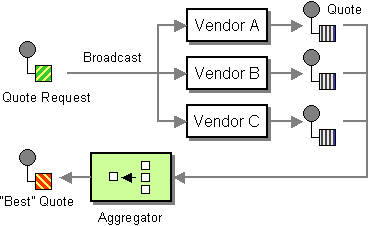
Aggregator

Aggregator is the pattern of receiving information from multiple sources and consolidating it into a single message. For an example of this pattern, see Aggregate.odx in Aggregator (BizTalk Server Sample).


Calling Pipelines from an Orchestration

You can call send and receive pipelines from your orchestrations. This allows the reuse of pipelines and helps maintain the decoupling of an orchestration from the pipeline stages. For an example of this pattern, see Aggregate.odx in Aggregator (BizTalk Server Sample). Another example is CMP.odx in Composed Message Processor (BizTalk Server Sample). See also How to Use Expressions to Execute Pipelines.


Composed Message Processor

Composed Message Processor is the pattern of processing individual items from an aggregated or batched interchange message. For an example of this pattern, see CMP.odx in Composed Message Processor (BizTalk Server Sample).


Content-Based Router

Content-Based Router is the pattern of determining the recipient of a message based on some part of the message content. For an example of this pattern, see CBRSample (BizTalk Server Sample).


Dynamic Router

Dynamic Router is the pattern of determining the destination address as well as the transport protocol based on the result of message processing. You can use a dynamic send port or a Role Link shape to implement this pattern. For an example of this pattern, see ReceiveSend.odx in SendMail. Another example is SupplierProcess.odx in PartyResolution (BizTalk Server Sample).


Error Handling

BizTalk Server allows you to designate automated handling of messaging failures as an alternative to the default behavior of placing failed messages in the Suspended queue. You can route failed messages to a subscribing port for reporting or processing. For an example of this pattern, see ResubmitLogic.odx in Error Handling (BizTalk Server Samples Folder).


Exception Handling and Compensation

You can use an exception handler and a Throw Exception shape or an Expression shape for exception handling. For example, you can place the following code in the Expression shape to throw the exception:-

excp = new System.Exception();
throw(excp);  

You can use a compensation block and a Compensate shape to perform the compensation on the transactions that have been committed. For an example of this pattern, see UpdateContact.odx in Compensation (BizTalk Server Sample). Another example is inCustom Exceptions.


Message Broker

Message Broker is the pattern of determining the destination of a message and still maintaining control over the message flow. For an example of this pattern, see OrderBroker.odx in File Inventory for the Business Process Management Solution.


Message Filter

The Message Filter pattern selects messages meeting particular criteria for processing. You can implement this pattern by adding the filter expression to an activated Receive shape. For more information, see Using Filters With the Receive Message Shape.


Message Translator

The Message Translator pattern converts a message from one form to another form. You can implement this pattern by using a BizTalk map with a Transform shape in an orchestration. For an example of this pattern, see HelloOrchestration.odx in HelloWorld (BizTalk Server Sample).


Parallel Convoy

The Parallel Convoy pattern enables multiple single items to join together to achieve something that an individual item cannot accomplish by itself. The set of related items can arrive in any order, but BizTalk Server must receive all of them before starting the process. For an example of this pattern, see http://go.microsoft.com/fwlink/?LinkId=56035.


Scatter and Gather

The Scatter and Gather pattern enables messages to be sent to multiple recipients and messages to be received back from each recipient. You can implement this pattern by using the Splitter pattern and the Aggregator pattern. You use the Aggregator pattern to assemble the results from using the Splitter pattern and put them under a Parallel Actions shape. For an example of the Splitter pattern, see SDK sample named Implementing Scatter and Gather Pattern at http://go.microsoft.com/fwlink/?LinkId=65185.


Sequential Convoy

The Sequential Convoy pattern enables multiple single items to join together to achieve something that an individual item cannot accomplish by itself. A sequential convoy is a set of related items that have a predefined order. Although the items do not have to be exactly the same, BizTalk Server must receive the items in a sequential order. For an example of this pattern, see http://go.microsoft.com/fwlink/?LinkId=56035.


Splitter

The Splitter pattern takes a single message and splits it into multiple messages. For an example of this pattern, see ConfirmOrderWithVendors.odx in File Inventory for the Business-to-Business Solution.


Suspend with Retry

The Suspend with Retry pattern enables the orchestration to suspend a message when there is an error. The suspension occurs within a loop so that the orchestration suspends, asks for intervention, and then retries the operation a fixed number of times. For an example of this pattern, see GetPurchaseOrder.odx in File Inventory for the Business-to-Business Solution.


BizTalk - Scatter / Gather Pattern

We recently encountered a BizTalk Orchestration Design problem: How do we maintain message flow when a message needs to be sent to multiple recipients, each of which may or may not send a reply, and then aggregate the response from all recipients into one message?

The Solution: One of BizTalk’s many powerful features is its ability to loosely couple messages, which allows for the subscription-based processing of messages. The ability to route messages based upon content filters makes BizTalk a great fit for the Scatter/ Gather pattern.

The Scatter/ Gather pattern is a method for broadcasting and processing messages in parallel. The "scatter" portion distributes a series of messages, all at the same time, and then an aggregator "gathers" the messages back into the main response before continuing.


Tuesday, December 1, 2009

Essential BizTalk Debugging Skills


On the topic of debugging skills, there are many things said and to be said, but I thought I’d take a moment to reflect on a few skills I believe BizTalk developers should develop to solve problems on their solutions effectively (in no particular order):

  1. Trace the execution of BizTalk processes end-to-end, covering both messaging and orchestrations. While this seems obvious at first, it can be tough on complex solutions that rely heavily on pub/sub and direct binding!
  2. Discovering the reasons why a service instance might be getting suspended. In particular, quickly finding any possible exception information coming from faulted instances.
  3. Using the orchestration debugger to figure out where a given Orchestration instance is getting suspended.
  4. Matching any receive shapes in an orchestration to the origin of messages coming for it. This might require matching logical ports with physical ports as well as possible direct-binding sources of messages.
  5. Tracking possible reasons for routing failures, particularly when correlations are involved. This includes being able to understand routing failure reports, checking the state of any required promoted property, comparing subscription information either directly on the message box as well as from reading orchestration code, and so on.
  6. Detecting and solving situations that stop flow/processing of messages, related to thread pool issues or thread starvation.
  7. Detecting zombie message instances and their possible consequences.
  8. Knowing how to enable the BAM tracing infrastructure to debug and solve issues with BAM not writing data to the BAM primary import database.
  9. Using the Visual Studio Debugger or WinDBG to debug BizTalk processes. This includes figuring out the right processes to attach to!
  10. Debugging assembly-loading/versioning issues. This includes how to use Fuslogvw.exe and friends.
(Source: Tomas Restrepo)